Samsung Galaxy Tab S2 9.7-inch Review

Introduction
- Samsung Galaxy Tab S2 9.7-inch
- microUSB cable
- Wall charger
- Quick start guide
- Safety & warranty documents
Design
It’s so lightweight and comfortable to use, you’d hardly know that you’re using a tablet.
Dramatic changes have come to this new tablet, as it totally sports a new design that actually follows after the Galaxy Note 4’s design language. That’s evident in how it employs a thin metal trim accent around its edges with a matte plastic chassis, which combine together nicely to give it a more appealing design than last year’s model. We can tell that it’s been designed to compete against the iPad Air 2, just because it trims off a lot of the fat to come up being skinnier, lighter, and having a smaller overall footprint than its rival. And it helps, too, in making it comfortable to use with one hand thanks to its feather-like weight – to the point that we have no discomfort holding it for a period of time.
Like many of Samsung’s newer products, it now features the newer fingerprint sensor, used by devices like the Galaxy S6 and Note5, so that it’s less of a hassle to operate than before. Gently resting our finger over the home button unlocks the tablet, which is considerably better than the frustrating swipe down motion that was implemented by its predecessor.

Display
Oddly, the resolution is a step below its predecessor, but it’s still a generally good looking display.
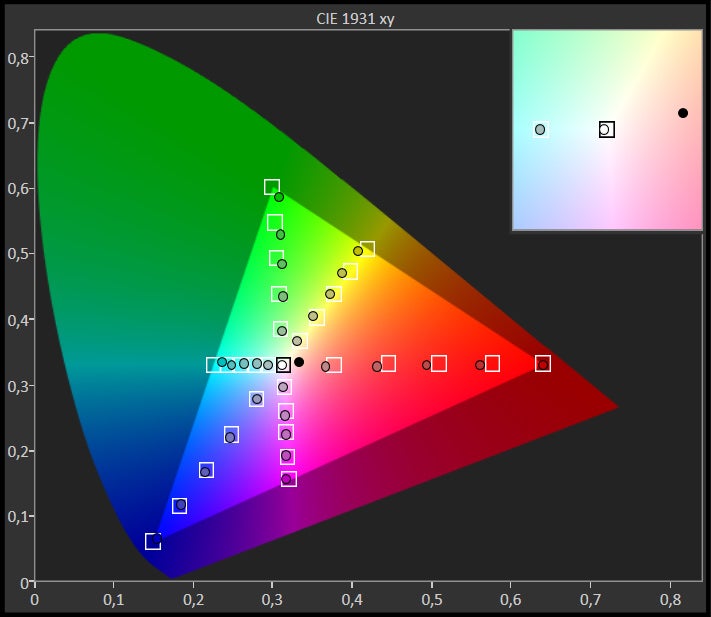
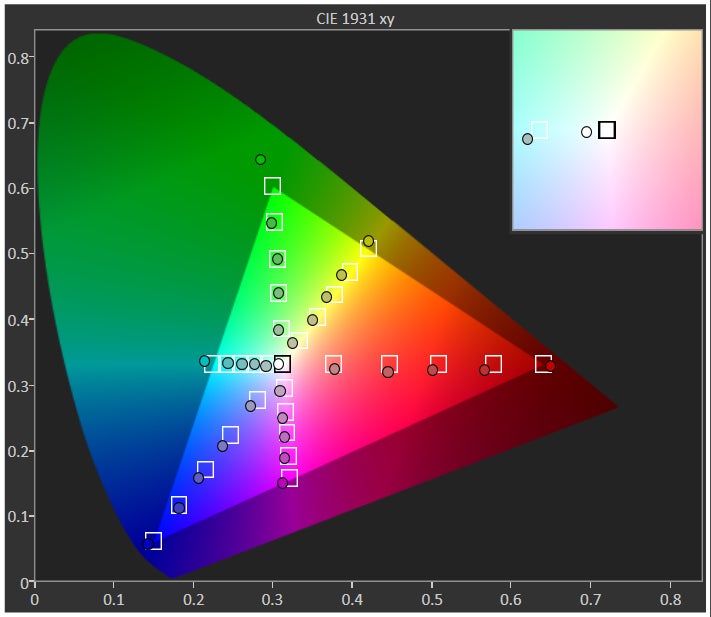
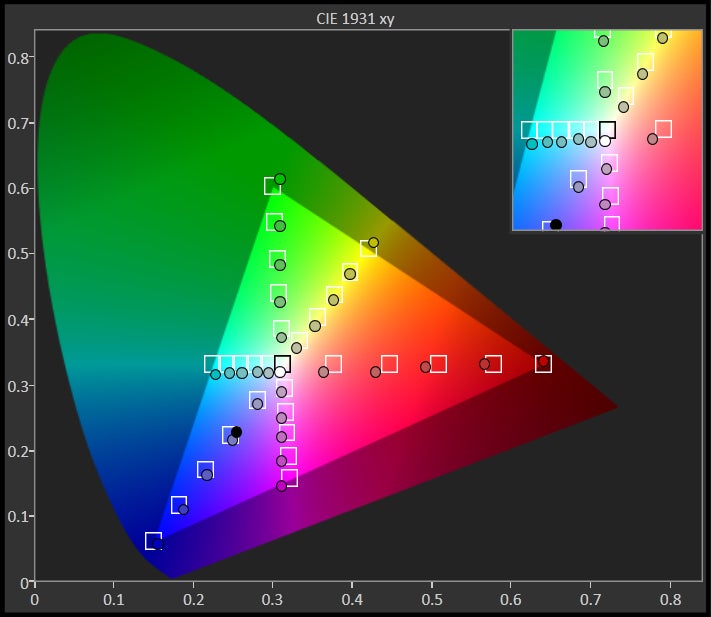
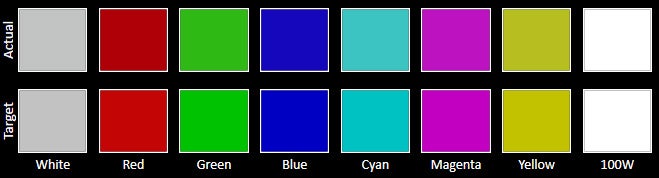
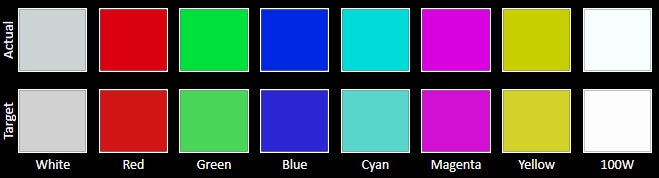
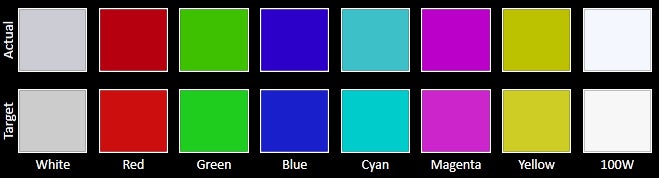
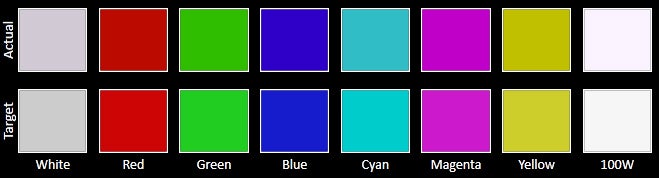
An odd gesture from Samsung, a company that’s known to always outclass its previous efforts in the specs department, they’ve decided to fashion the Galaxy Tab S2 9.7-inch with a lower resolution display. This time around, it’s flaunting a 4:3 aspect ratio with its 9.7-inch 1536 x 2048 Super AMOLED display – whereas with the Tab S 10.5, it offers a widescreen format 10.5-inch 2560 x 1600 Super AMOLED panel. Even though there’s still a great deal of detail produced by it, thanks to its 264 ppi pixel density, it’s technically still not as pixel dense than Samsung’s previous effort.
Another area that takes a step back, especially for Sammy, is seen in how the screen emits a lower luminance. In this particular case, it maxes out at a meager 375 nits, which poses trouble when it’s used outdoors with the sun’s presence glaring down on it. By comparison, the Galaxy Tab S 10.5 fared a bit better at 395 nits. While it's a fact that the screen is a step backwards from its predecessor in certain areas, it’s still a pretty good looking panel! There’s enough iridescence, wide viewing angles, and brilliance to make it a compelling visual treat to the eyes.





Interface and Functionality
Great for everyday use, the TouchWiz experience caters well to the tablet size, but it lacks the breadth of features found with the Note5’s paper & pen experience.
Continuing to employ the same trimmed down TouchWiz we’ve been seeing since its introduction earlier this year with the Galaxy S6, the experience favors simplicity above everything else. Staple TouchWiz features are found here, such as Multi-Window for true side-by-side app multitasking, pop-up-view that shrinks certain apps to a more thumb-reaching friendly size, and the wealth of S-branded apps from Samsung.
Indeed, TouchWiz on the Galaxy Tab S2 9.7-inch continues to be a powerful experience, but it doesn’t rival the higher degree of functionality we get from the Note5’s particular experience. Of course, the addition of an S Pen would greatly benefit and deepen its package, but we suppose that might come later on in some other tablet from Samsung. For everyday use, we can’t argue its usefulness.
Processor and Memory
Although it’s not the latest piece of silicone from Samsung, the older Exynos 5433 chip still delivers a zippy performance.
You would think that Samsung would leverage its latest Exynos chipset to power its finest tablet, but that’s not really the case. Instead, it’s armed with the same firepower found in the Note 4 – an octa-core Exynos 5433 SoC accompanied with 3GB of RAM and the Mali-T760 GPU. Deciding on using this particular setup makes the Tab S2 rather underwhelming in contrast to the other models in its portfolio, but despite that, the performance is pretty responsive.
Call it a refreshing change of pace, the Galaxy Tab S2 9.7-inch features a microSD card slot, which is something that we don’t get in Samsung's other new devices. It complements the 32GB and 64GB storage variants that the tablet is available in.
Internet and Connectivity
What’s there not to like about the web surfing experience here, especially on a high-spec’d tablet? None honestly, mainly because it hits the high points in all the areas we care about most. In particular, we have speedy page loads, quick handling of page rendering on the fly, and we can’t forget about its oh-so smooth navigational controls.
Camera
It takes some good shots for a tablet, but it’s definitely not as on-point and sharp like the S6 and Note5.
Over on the camera side, it doesn’t look like Sammy changed anything about the camera combination here with the Tab S2 9.7-inch – so that’s an 8-megapixel rear camera and a front-facing 2.1-megapixel one. However, the rear camera has been paired with a new, wider f/1.9 aperture lens, which should give it an advantage under low light over its predecessor. For a tablet, the cameras seem well within the threshold we’d expect.
The results, naturally, are quite inviting for a tablet – so yeah, you can go ahead and use it to capture some memories. While the quality is good for a tablet, it’s not on the same level as the Galaxy S6 or Note5, but regardless of that, there are enough favorable results when lighting is sufficient. There’s enough emphasis on fine details, which are marked by its slightly cooler color reproduction. And while it seems to have difficulty with dynamic range on the automatic setting, the HDR mode works well in offering an equal exposure throughout the shot.
Samsung Galaxy Tab S2 9.7-inch sample images
Presented with four options for shooting video (QHD, FHD, HD, and VGA), its optical image stabilization only becomes available with 720p and 1080p recording. Still, the Galaxy Tab S2 9.7-inch takes some decent looking videos – for a tablet, obviously. While colors are mostly convincing, details are noticeably lacking, resulting in a somewhat unclear image quality. Its focus adjustments run smoothly and quickly, while audio recording is clean and noise-free.
Samsung Galaxy Tab S2 9.7-inch Sample Videos
Multimedia
It’s nice to find dual front-firing speakers, but it’s disappointing that it’s flatter with its tone.
Battery
Battery life seems to be way behind the pack in the tablet space.

Yes, it’s able to achieve more than a solid-one day of usage in our real-world, everyday experience. Despite that palpable reach, it fails way short against its predecessor and rivals in our custom battery benchmark test – to the degree of 6 hours and 46 minutes. That’s even shorter than the times we get out of most high-end smartphones, so it’s rather unimpressive.
Certainly, its 263 minutes of charging time might seem excessive when compared to some of the rapid-charging phones we’ve been exposed to of late, but it’s actually an improvement over the Tab S 10.5-inch – and it’s even faster than some other tablets out there. Well, it’s worth noting that the charging time was achieved using one of Samsung’s rapid charging wall adapters. However, it comes out of the box with a standard one.
Conclusion

In the back of our minds, though, we can’t help but think that this is, in a way, a step backwards for Samsung. No doubt, it exudes and embodies the characteristics of high-end tablet, but there are a few features removed from this that were found with last year’s offering in the Galaxy Tab S 10.5-inch. With this, we don’t get an IR blaster, and its battery life has been weakened – all of them are revelations that we find alarming.
Thinking about it in that way, it makes us believe that there’s still more value found with its predecessor, especially when it can be fetched for far less now. While it certainly meets that expectation of being a fun tablet that can be used for an assortment of occasions, it still lacks the productivity specific set of functions that give the Surface 3 more of an advantage to power users. We know that Microsoft’s Office suite is preloaded here, but Android as a whole still has some limitations to it that prevents it from competing in the same scope as a Windows 10 powered tablet.
Buy this for the design and svelte construction. If not, it might be worth a shot picking up the Galaxy Tab S 10.5-inch instead – that’s just as long as you can tolerate its less-than-appealing design.
Software version of the review unit:
Android Version: 5.1.1
Build Number: LMY47X.T810XXU1BOH7
Kernel Version: 3.10.9-5659114

Follow us on Google News





Things that are NOT allowed:
To help keep our community safe and free from spam, we apply temporary limits to newly created accounts: